Keyboard settings 2.0
Settings › Keyboard is where the key map lives. Since 2.0 it is a table you edit — pick a command, record a key, limit it to some sites — and the script is still there underneath for anyone who would rather write it.
Three modes
| Mode | What it does |
|---|---|
| Default | The key map the app ships, shown as a read-only table so you can see what is bound. Nothing to maintain. |
| Custom | The same table, editable. Switching to Custom seeds it with the default map; from there you add, change and delete shortcuts. The app turns the table into a settings script for you. |
| Script | A code editor with the settings script itself, validated as you type. For anything the table cannot express — a binding that depends on a function you wrote, say. A script that only uses settings.map opens back as a table; one with other JavaScript stays a script, and the table says so. |
Three keys are outside all three modes: Esc (Normal mode), ↩ (open the selected link) and ⌫ (delete a label letter) are bound by the system map first and are not in the table.
The shortcut table
Commands are grouped: Scrolling, Links, Link Mode, Tabs, Navigation, View & Media, Search & AI. Each row is one command with its key caps; a command may have several rows (Half Page Down has d and Space). Rows with an exclusion show the sites it is off on. Right-click (or swipe on iOS) to edit or delete.
Link Mode is its own group because its keys only apply after f: Next Link, Previous Link, Open Selected Link, Open Selected Link in a New Tab. They may share a key with a Normal-mode shortcut without conflicting — the modes never see the same key press.
Restore Shortcuts to Default throws the table away and seeds it again.
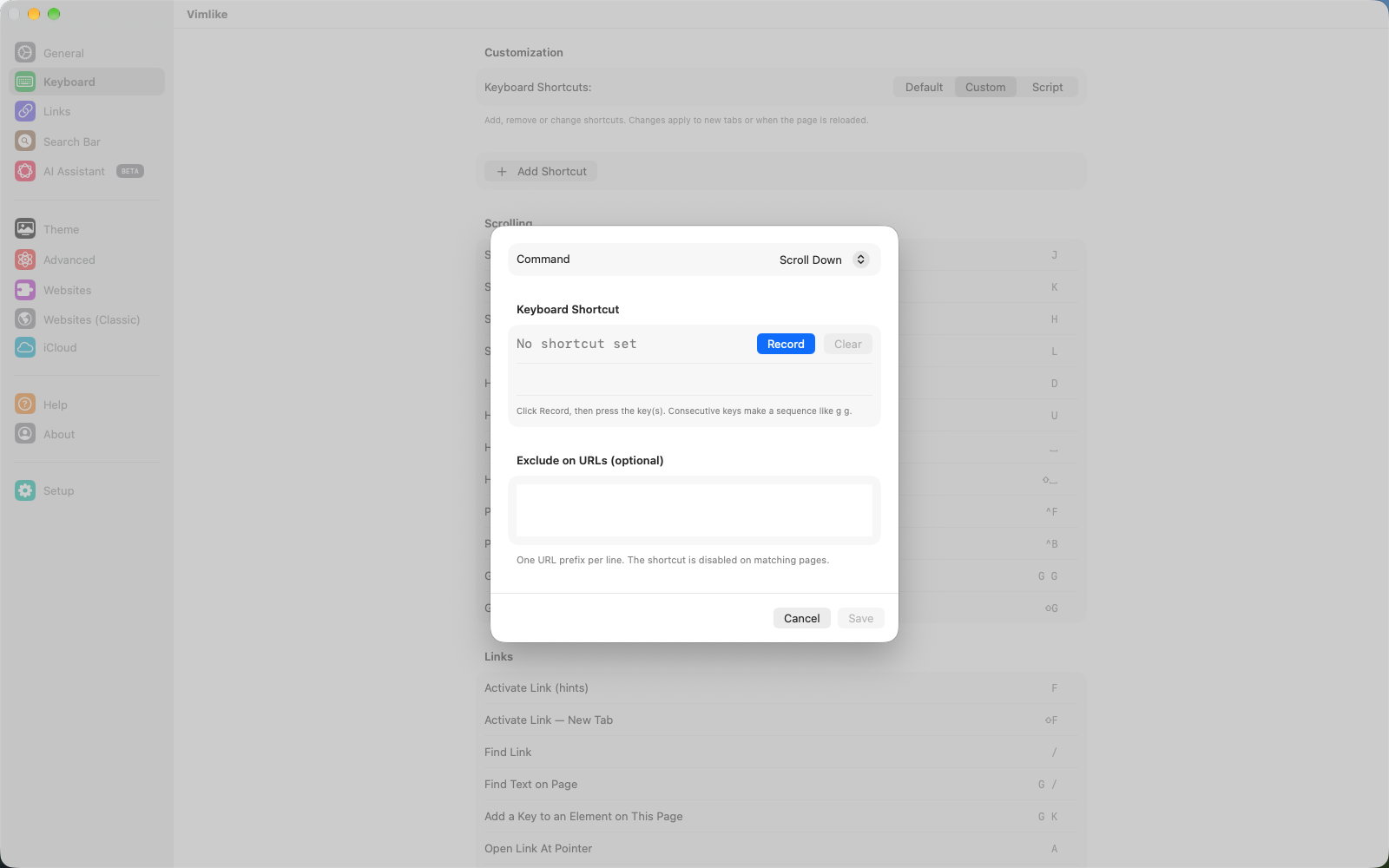
Adding and editing a shortcut
- Add Shortcut at the top of the table, or Edit on a row, opens the sheet.
- Command — a grouped list of every command (below), with search.
- Keyboard Shortcut — type the chord the way the script spells it (
g g,ctrl+f,shift+slash), or press Record and press the keys on a hardware keyboard; two keys pressed in a row become a sequence. The preview shows the key caps as the cheat sheet will. - Exclude on URLs — one URL prefix per line. The shortcut does nothing on pages that start with it. This is how Space scrolls everywhere except YouTube and Netflix watch pages, where it plays and pauses.
- Done. The table re-sorts into its groups and the script is regenerated and saved; open tabs pick it up on their next load.
Keys on a site, not everywhere. A key that should exist on one website only — "open the inbox" on Gmail — belongs in that website's settings, not here. Press gk on the page and click the element, or let the AI suggest the keys.
Conflicts
A row turns orange when it collides with another in the same mode: the same key twice, or a key that is also the start of a sequence (g next to gg — the single key would never fire). Saving is still allowed; the later binding wins, as in the script. A Normal-mode key and a Link-mode key never conflict.
The settings script
Custom mode writes this file; Script mode lets you edit it. It is JavaScript with one call that matters:
// settings.map(keys, command [, { excludes: [urlPrefix, …] }])
settings.map('j', VLCommand.SCROLL_DOWN);
settings.map('g g', VLCommand.SCROLL_TO_TOP);
settings.map('shift+f', VLCommand.ACTIVATE_LINK_WITH_NEW_TAB);
settings.map('space', VLCommand.HALF_PAGE_DOWN,
             { excludes: ['https://www.youtube.com/watch', 'https://www.netflix.com/watch/'] });
Key grammar
- One chord is optional modifiers then one key:
ctrl+,shift+,command+,alt+— then a letter, a digit, or a named key:slash,period,comma,semicolon,quote,backquote,bracketleft,bracketright,backslash,minus,equal,space,tab,enter. - A sequence is chords separated by spaces:
'g shift+t'. - A shifted symbol may be written as itself:
'?'is'shift+slash',':'is'shift+semicolon'. - Keys are matched by the character the layout produces. Ignore Keyboard Layout (Settings › Advanced) matches by physical key instead, so a Korean or Dvorak layout still gets j where QWERTY has it.
In Custom and Script modes the shipped map is not loaded underneath — what the script maps is the whole key map. Deleting a row is enough to unbind a key.
Every command
The VLCommand names the table and the script use.
| Group | Commands |
|---|---|
| Scrolling | SCROLL_DOWN SCROLL_UP SCROLL_LEFT SCROLL_RIGHT HALF_PAGE_DOWN HALF_PAGE_UP PAGE_DOWN PAGE_UP SCROLL_TO_TOP SCROLL_TO_BOTTOM |
| Links | ACTIVATE_LINK ACTIVATE_LINK_WITH_NEW_TAB SHOW_CONSOLE (find a link) FIND_TEXT PICK_KEY OPEN_LINK_AT_POINTER OPEN_LINK_AT_POINTER_IN_NEW_TAB OPEN_LINK_AT_POINTER_IN_NEW_INCOGNITO_TAB |
| Link mode | NEXT_LINK PREV_LINK OPEN_SELECTED_LINK OPEN_SELECTED_LINK_IN_NEW_TAB |
| Tabs | NEW_TAB CLOSE_TAB NEXT_TAB PREV_TAB MOVE_TAB_TO_LEFT RESTORE_TAB DUPLICATE_TAB DUPLICATE_INCOGNITO_TAB OPEN_LAST_TAB OPEN_TAB1 … OPEN_TAB9 MARK_TAB OPEN_MARK_TAB |
| Navigation | GO_BACK GO_FORWARD GO_TO_URL_UP GO_TO_URL_ROOT RELOAD COPY_CURRENT_URL |
| View & media | VISUAL_MODE VISUAL_LINE_MODE CARET_MODE DARK_MODE ZOOM_IN VIDEO_FULLSCREEN VIDEO_PIP TOGGLE_HELP FOCUS_INPUT INSERT_MODE |
| Search & AI | SHOW_COMMAND_BAR (the bar) SHOW_AI_BAR SHOW_AI_COMMAND_BAR (the : palette) |
DARK_MODE, MARK_TAB, OPEN_MARK_TAB, MOVE_TAB_TO_LEFT,
SHOW_AI_BAR and the Open-Link-At-Pointer commands have no default key; bind one if you want them.
Related settings
| Where | What |
|---|---|
| Keyboard › Special Keys | ` (US) or § (UK) acts as Esc — for Apple's iPad keyboards, which have none. |
| Keyboard › Shortcut Help | The cheat sheet along the bottom of the window, on by default on Mac and iPad. ? toggles it on a page. |
| Links | Hint labels in letters, numbers, both or your own characters; put images, videos and headlines first; blur images while hints show; animate the click. |
| Search Bar | What the bar searches (tabs, history, top sites, the web — Google or DuckDuckGo), opening results in a new tab, the history and scroll keys, Enter required to open a found link. |
| General | Start in Normal or Insert mode, scroll animation and speed, what a new tab opens with. |
| Advanced | Ignore keyboard layout, stop pages focusing a field on load, select a field's text when Vimlike focuses it, show script errors in the HUD. |
Next: AI assistant →