Jasmine Studios
A Safari extension for YouTube

The video, lit by itself.
Everything else,
out of the way.

Better Player dims the whole YouTube page around the video, moves it to the middle of the screen, and casts a glow in the colours of the frame that is playing. The ads are hidden before the page paints and the skippable ones skip themselves. One free app for iPhone, iPad and Mac.

Download on the App Store Free · No account · Nothing collected
esc leave focus mode 10 skip either way Picture in Picture 11 languages

A dark room for one video.

YouTube is built to pull you sideways — the next thumbnail, the comments, the endless rail down the right. Better Player leaves all of it on the page and takes the light away from it, so the only lit thing on screen is what you came to watch.

Focus mode

The page goes dark, the video steps forward into the middle of the screen, and the chrome around it disappears.

Ambient light

A soft glow spills out from behind the video in the colours of the frame that is playing, and drifts as the scene changes.

No ads

Ad slots are hidden by a stylesheet before the first paint, and a skippable ad has Skip pressed for it.

Focus mode

Everything but the video,
turned down.

A dark layer covers the page and the video is lifted through it. Nothing is removed and nothing is rearranged — scroll and the comments are still there, exactly where YouTube put them. Press esc, or the close button in the corner, and the room lights come back up.

  • Centred, not just dimmed The player moves to the middle of the window rather than sitting off to the left with a sidebar's worth of empty space beside it.
  • Starts on its own Open a video and focus mode is already on. Switch auto-start off and the page stays as YouTube built it until you ask.
  • Holds through the page's own churn YouTube rebuilds its player as you move from video to video. Better Player watches for that and puts the video back on top rather than losing it behind the dim.
  • Rounded corners, or square A small thing, and a switch in settings like everything else here.
Focus mode needs YouTube's desktop site. On iPad and Mac that is what you get. On iPhone, YouTube serves its phone layout, and there Better Player gives you the playback controls and the ad blocking — ask for the desktop site and focus mode comes with it.
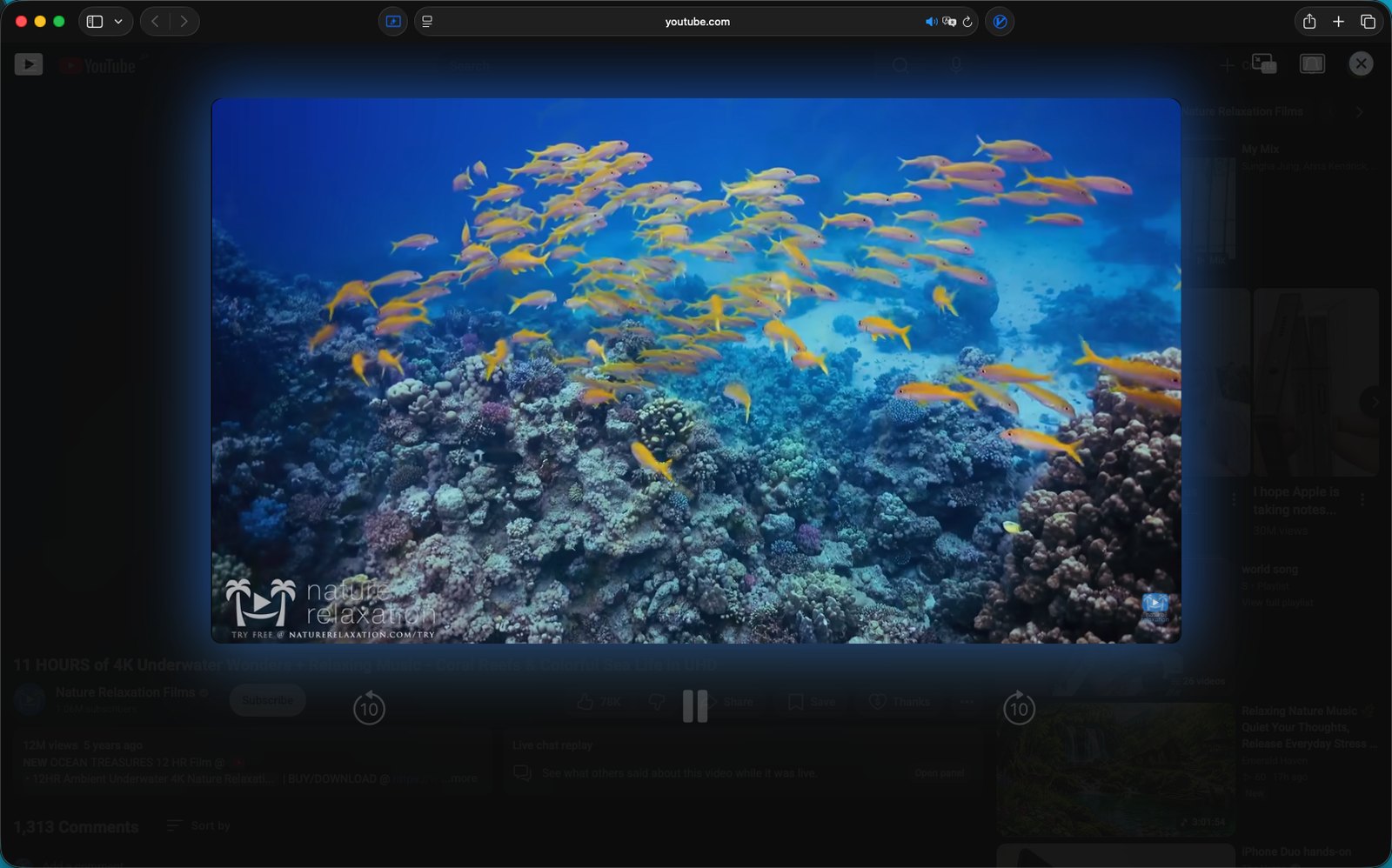
Focus mode in Safari on a Mac, the page dark behind the video
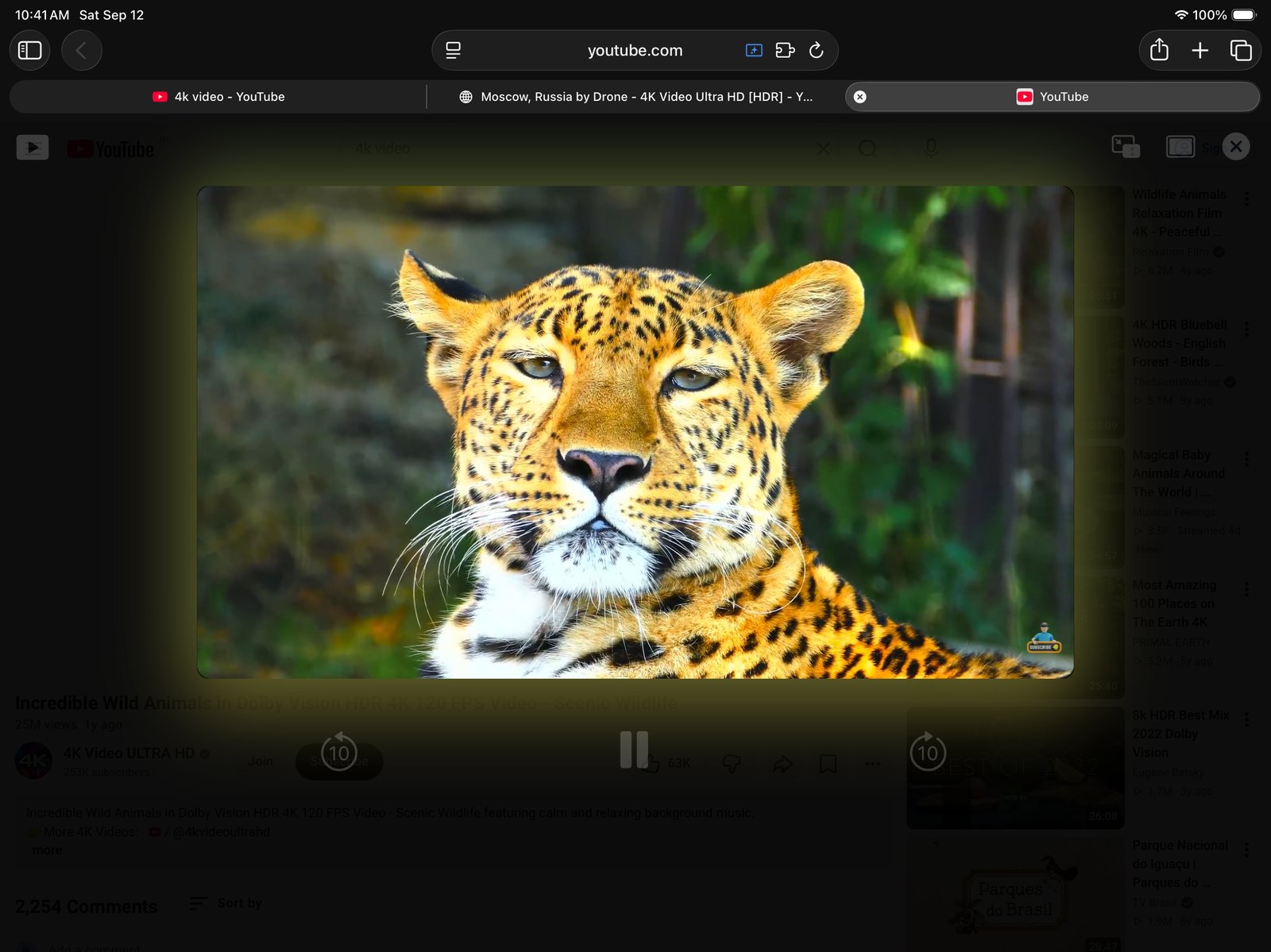
The same thing on iPad, with the playback controls over the dimmed page
Ambient light

The glow comes from
the frame that is playing.

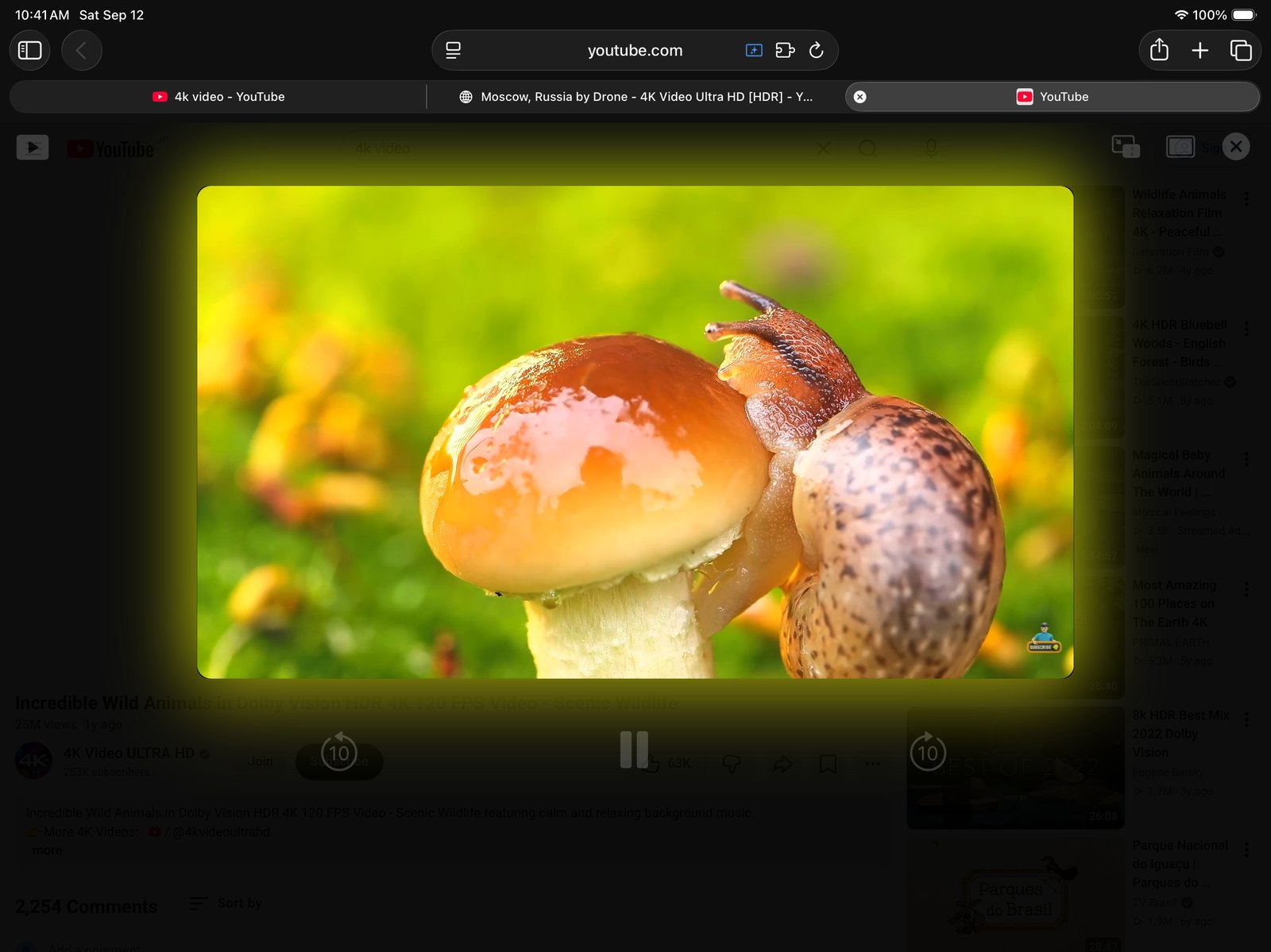
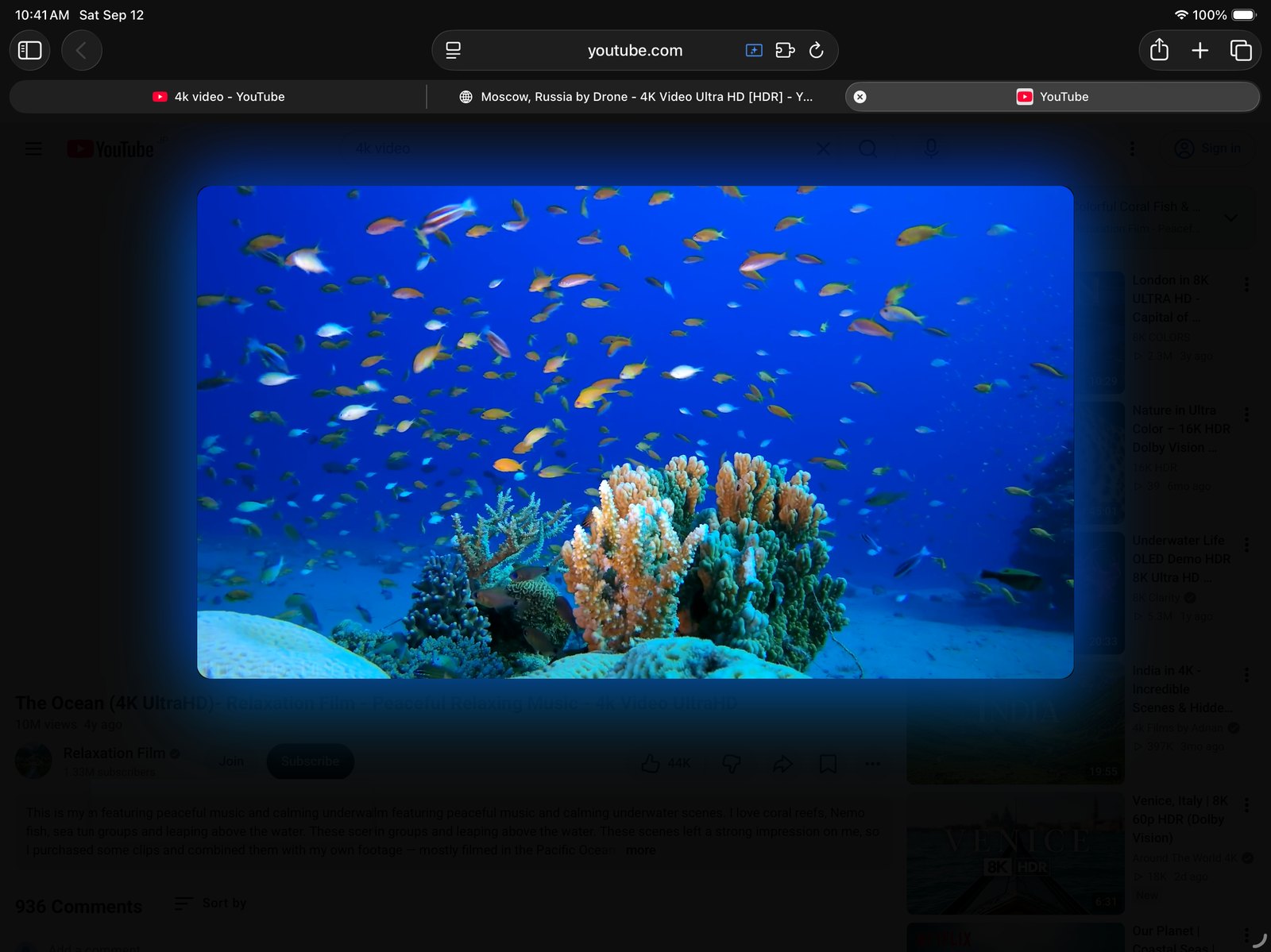
Five times a second Better Player reads the frame on screen, takes the colour from each edge of it, and paints that back out behind the video as a soft shadow. A reef throws blue across the page; a field of mushrooms throws yellow-green. It moves the way the scene moves.

  • Read from the video itself Not an average of the thumbnail or a colour the page declares — the actual pixels of the frame you are looking at.
  • Eased, not flickering Colours drift toward the new frame instead of snapping to it, so a cut in the video does not strobe the page.
  • Size and strength are yours Two sliders in settings: how far the glow spreads, and how strong it is. Turn it down to a hint, or off.
  • Idle when you are Pause the video, or switch to another tab, and the sampling stops. The last glow stays where it was.
A reef video throwing blue light onto the dimmed page around it
A different video, and the glow turns yellow-green with it
Shorts

Shorts, the same way.

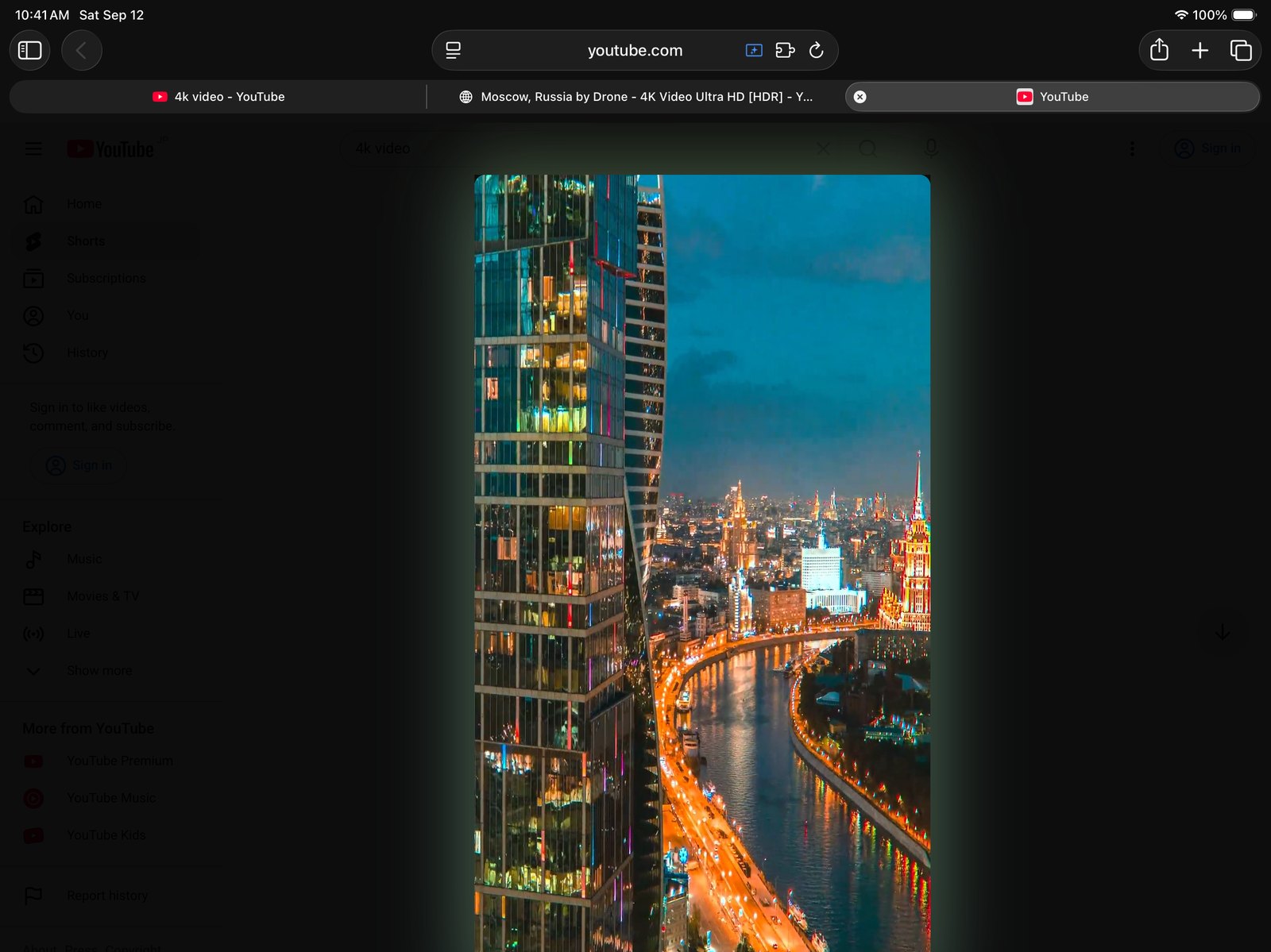
A reel is a video too. Focus mode dims the guide and the rail, lifts the reel through, and lights it the same way — and the column of buttons stacked down its right edge goes with the rest.

  • The reel, lit and alone Vertical video gets its glow drawn from the columns down each side, where a reel actually has its colour.
  • The action rail goes Like, dislike, comment, share, the rest of the stack beside the reel — hidden while you watch, back when you leave.
  • The next reel is untouched Only what sits beside the reel you are watching is hidden. Swipe on and the next one arrives whole.
  • Or leave Shorts alone One switch in settings keeps focus mode to watch pages only.
A vertical Short lit by its own colours with the action buttons hidden
The controller

Big buttons, where
your hands already are.

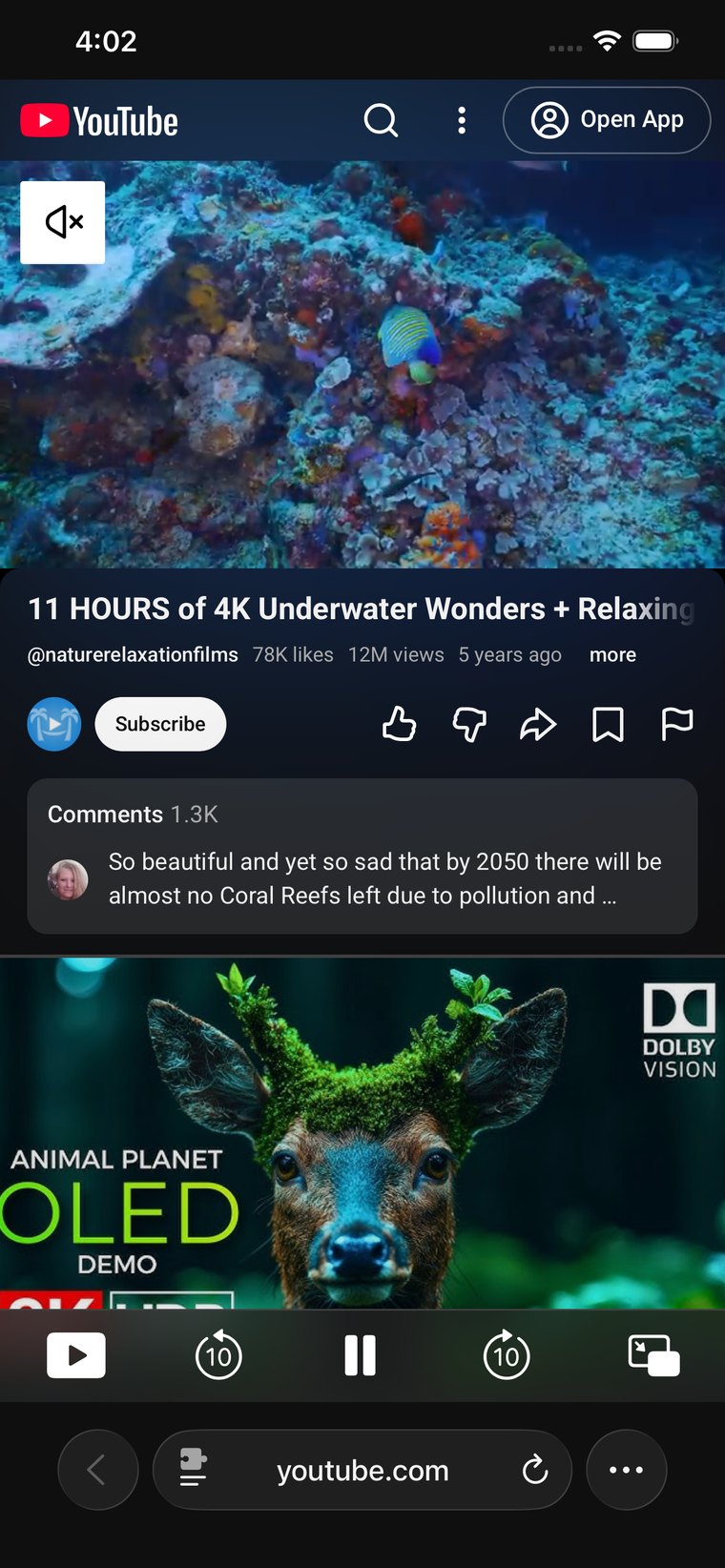
YouTube's own controls are built for a mouse. Better Player lays its own row where your thumb already is — large enough to hit without aiming, and out of the way of the video. It is the part of Better Player that works everywhere, phone layout included.

Back 10 seconds Play and pause Forward 10 seconds Previous and next Picture in Picture Full screen Home

Every one of them can be switched off. Keep the two you use and let the rest go.

A YouTube video on iPhone with Better Player's controller row along the bottom
Privacy

No account.
No server of ours.

Better Player is a Safari extension and nothing else. There is no backend it could send anything to, no analytics SDK inside it, and no sign-in. Your settings live on your own device.

Nothing is collected

No browsing history, no watch history, no identifiers. Nothing leaves the extension.

Why it asks for access

Safari has to let the extension read and restyle youtube.com for any of this to work. That permission is what the dimming and the ad hiding run on.

Buy nothing, ever

No in-app purchases, no subscription, no ads inside the app.

Eleven languages

The app and its settings speak yours, or near enough.

English 한국어 日本語 简体中文 繁體中文 粵語 Deutsch Français Español Italiano Português
Settings

Nothing here is
decided for you.

Every part of Better Player is a switch or a slider in the app. Turn the whole thing down to an ad blocker, or up to a cinema.

Focus modeon / off
Start automaticallyon / off
Ad blockingon / off
Apply to Shortson / off
Ambient lighton / off
Glow sizeslider
Glow strengthslider
Background darknessslider
Centre the videoon / off
Rounded cornerson / off
Which buttons showeach one
Button opacityslider

Free. All of it.

No paid tier, no in-app purchase, no subscription. Buy it once — which is to say, don't — and it runs on every device signed into your Apple Account.

Better Player $0 iPhone · iPad · Mac
  • Focus mode, centring and ambient light
  • Shorts support
  • Ad hiding and auto-skip
  • On-screen controller, Picture in Picture, full screen
  • Eleven languages
Get Better Player

Requires Safari on iOS 16 or later, or a Mac. Ambient light, centring and Shorts run on YouTube's desktop site.

Questions, answered.

How do I turn it on?

Install the app, then enable Better Player in Safari's extension settings and allow it on youtube.com. The app walks you through it, and the setup guide has the screenshots. After that, open a video — focus mode starts on its own unless you tell it not to.

Does it work on iPhone?

Yes, with a difference. YouTube serves iPhone its phone layout, and there Better Player gives you the playback controller and the ad blocking. Focus mode, ambient light and Shorts support are built on YouTube's desktop site — you get them on iPad and Mac, and on iPhone if you ask Safari for the desktop site.

Does it block every ad?

It hides the ad slots on the page before the first paint, clears the ones YouTube injects into the feed afterwards, and presses Skip on a skippable ad in the player as soon as the button appears. An unskippable ad still has to play; nothing here breaks YouTube's playback to get around one.

Why does it need access to the website?

Because restyling a page is the whole job. Safari will not let an extension dim youtube.com, move the player or hide an ad slot without permission to read and change that site. Better Player asks for youtube.com and does nothing with it beyond what you see here.

Can I keep the ad blocking and drop the rest?

Yes. Switch focus mode off and Better Player leaves the page alone apart from the ads. The reverse works too — ad blocking off, the dark room on.

Does the glow slow the video down?

It reads a handful of pixels five times a second, and stops entirely when the video is paused or the tab is in the background. If you would rather it did not run at all, one switch turns it off.

Do I buy it again for my Mac?

No. It is one free app, and the Mac version comes from the Mac App Store under the same Apple Account.

Turn the lights down.

Better Player for iPhone, iPad and Mac.

Download on the App Store